Plus Messenger
- 3.9
- Rating
- 50.00M
- Installs
- Free
- Price

 Analysis by App-foxy
I approached Plus Messenger as a practical communication app rather than as a completely separate messaging network. It is an unofficial client built by rafalense that uses Telegram’s API, so its appeal depends on how much you value a different Telegram experience instead of needing to persuade all your contacts to join another service. After spending time with it, my view is fairly clear: it can be a useful choice for people who already communicate through Telegram and want an alternative interface, but it is not automatically the best replacement for Telegram’s official app.
The app is free to install and is listed for Everyone, which makes trying it relatively straightforward. It has reached over 50 million installs and carries an average rating of 3.9 from around 883 thousand ratings, so this is not an obscure experiment with no established audience. At the same time, the rating suggests a mixed experience rather than universal approval. I would treat that as a reason to test it with your own account and routine instead of assuming that a large install base guarantees a smooth fit.
How Plus Messenger fits into everyday messaging
I judge Plus Messenger by how well it fits into the messaging habits I already have, not by whether it promises to replace every other app. Since it uses Telegram’s API, the useful question is whether its alternative client experience makes familiar chats easier to handle. That makes the first trial especially revealing: I’d pay attention to which conversations I reach for most and where the usual flow starts to feel crowded.
You May Also Like

 Blood Strike: 2.5 Anniversary
Blood Strike’s Loadouts Turn Every Drop Into a Tactical Gamble
A close look at Blood Strike’s custom loadouts: how fast access to signature weapons reshapes its battle royale rhythm, rewards preparation, and narrows the gap between fights.

 Pandora - Music & Podcasts
Pandora’s Music Is Easy to Start, but Harder to Recover
Pandora’s strength is its low-effort path from a seed to a station. Its weak spot is how much confidence it asks you to place in connection, setup, and quiet recovery.

 8 Ball Pool
 Is Built on Rivalries, Rematches, and Routine
A close look at the rivalries, rematches, shared routines, and unanswered safety questions that turn a quick pool match into a persistent mobile community.

 Samsung Music
’s Quiet Strength Is Playing What You Already Own
Its reach comes less from spectacle than from dependable access to a personal library. That simplicity is both the app’s strongest retention engine and its ceiling.

 AccuWeather: Weather Radar
AccuWeather Review: A Quick, Clear Forecast for Everyday Decisions
For everyday plans, the best forecast is the one you can understand quickly. AccuWeather makes rain timing, radar, and local conditions easy to act on, with a few trade-offs.

 Hill Climb Racing
Why Hill Climb Racing Still Turns Crashes Into One More Run
A tiny car, a bumpy hill and one more upgrade: Hill Climb Racing keeps resurfacing because its simple chaos makes every near-miss feel personal.
More From Our News Desk
View All News


A Telegram-based client, not a new contact network
The most important thing to understand is the relationship with Telegram. Plus Messenger uses Telegram’s API, which means the practical value comes from accessing Telegram communication through this unofficial app. Your decision is therefore less about choosing between two entirely different messaging communities and more about choosing which client you prefer for Telegram conversations.
That distinction matters when comparing it with the usual alternatives. WhatsApp, Signal, and Telegram’s official app each present themselves as the primary place to message people. Plus Messenger is different: it is attractive mainly when your contacts, groups, and channels already live in Telegram. If nearly everyone you message uses WhatsApp, installing this app will not solve the basic problem of where your conversations happen. If your friends and work groups already use Telegram, the alternative client becomes much more relevant.
I also would not describe it as an independent service with its own separate social graph. The app’s usefulness follows the Telegram account and ecosystem behind it. That can be convenient because you do not have to rebuild your communication habits around a new platform, but it also means Plus Messenger inherits the need for Telegram to be part of your daily life.
What the free access means in practice
There is no purchase required to install the app, and that makes the initial decision simple: download it, sign in through the Telegram-based setup, and see whether its handling of conversations suits you. The free entry point is the strongest part of its value proposition because you can compare it with your current Telegram client without committing money first.
The app does include in-app purchases ranging from $5.99 to $94.99 per item. I would not treat those figures as a reason to assume that every useful part of the experience is locked behind payment. The sensible approach is to use the free version first, identify the exact limitation you encounter, and only then decide whether a purchase offers enough value. This is especially important because the benefit of an unofficial client is highly personal: a feature that feels essential to one Telegram user may be irrelevant to another.
For me, the free installation makes Plus Messenger easy to evaluate, while the paid layer deserves a more cautious attitude. I would not pay simply because the app has a long history or a large audience. I would pay only if the specific improvement solves a recurring annoyance in my own messaging routine.
Where the alternative client can be useful
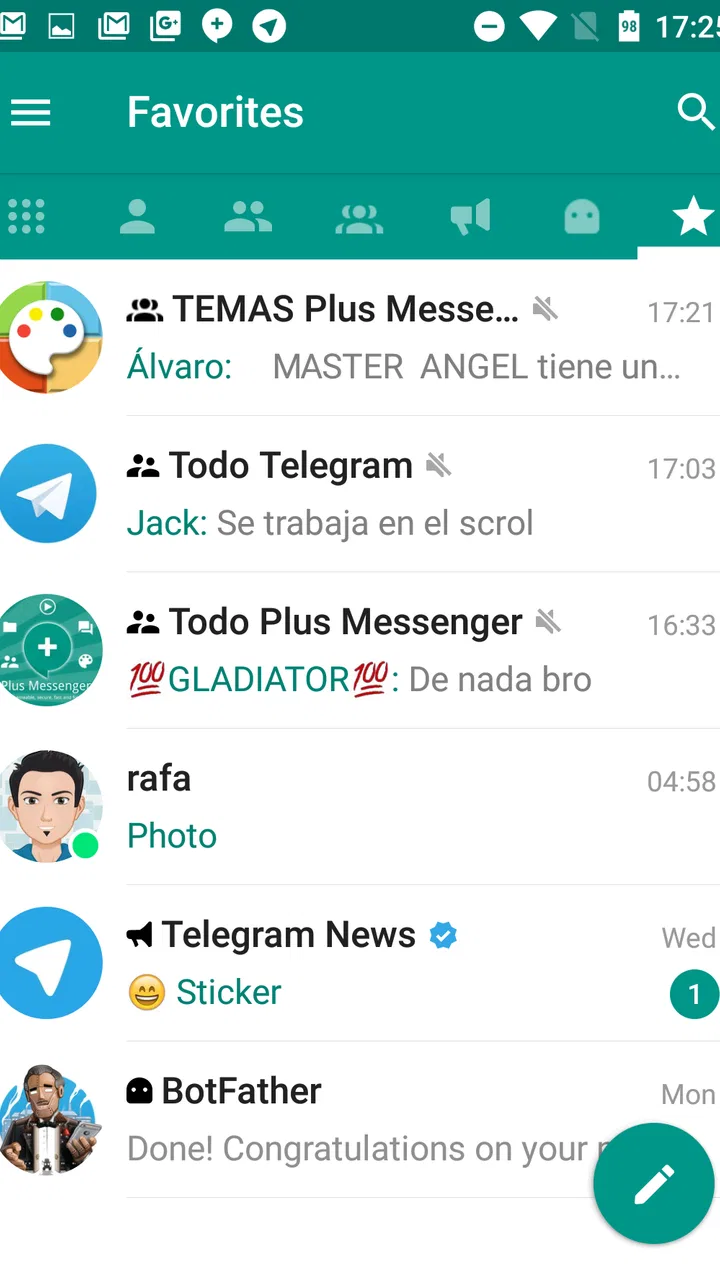
An unofficial Telegram client can make sense when the official app’s presentation or organization does not match the way you think about conversations. Some people prefer to separate personal chats, group discussions, channels, and work-related threads more clearly than a standard layout allows. In that situation, an alternative client may feel less like a novelty and more like a way to impose order on a busy account.
One realistic example is a user who checks several Telegram communities during a commute, answers family messages later, and keeps a small work group active throughout the day. With everything mixed together, important messages can disappear under a stream of channel updates. I found that the right way to judge Plus Messenger is not by opening it for a minute and admiring the interface, but by using it during that kind of crowded day. The question is whether its organization helps me reach the conversation I need without adding another layer of confusion.
It can also be useful for someone who wants to keep the official Telegram app installed while testing a different client. That approach reduces the risk of disrupting an established routine. I would begin with low-pressure conversations and a few familiar groups, then check whether notifications, message navigation, and returning to older discussions feel dependable before making it my main client.
Three practical habits that make testing more meaningful
My first tip is to test the app with a mixture of chat types instead of only one private conversation. A client may feel perfectly comfortable for direct messages but less convenient when a group becomes busy or when a channel produces frequent updates. Use a personal chat, an active group, and a channel you actually follow. That gives you a more honest picture of whether the app handles your real Telegram life.
Second, compare the same task in Plus Messenger and the official Telegram app immediately afterward. Do not rely on memory. Try finding an older message, switching between conversations, muting a noisy thread, and returning to a chat after receiving a notification. Small differences become much easier to notice when the two experiences are fresh in your mind. This side-by-side check is more useful than judging the app from its first impression.
Third, treat account access and notification behavior as part of the trial, not as minor details. Because this is an unofficial client, I would be more deliberate about checking that messages arrive when I expect them and that the app behaves consistently after being closed and reopened. I would also avoid making it my only way to reach important conversations until I had used it long enough to trust the routine.
The trade-off of choosing an unofficial app
The central trade-off is flexibility versus reassurance. A third-party client may offer an experience that feels better organized or more comfortable, but the official Telegram app remains the obvious reference point for support, familiarity, and direct alignment with the service it represents. When something behaves unexpectedly, users of the official app generally have a simpler path for deciding whether the issue is with Telegram itself or with the client they chose.
That does not make Plus Messenger a poor choice. It means I would keep expectations realistic. The app is best understood as an alternative way to use Telegram, not as a universal upgrade. If your priority is the most straightforward relationship with Telegram, the official app is the safer default. If your priority is trying a different client because the standard experience does not suit your habits, Plus Messenger deserves a fair trial.
Another trade-off is consistency across devices. Even when an alternative client works well on one phone, switching between devices can expose differences in navigation and notification habits. I would not recommend changing clients immediately before a trip, a demanding work period, or any situation where missing a message would cause trouble. Give yourself time to learn where things are and how the app behaves in the background.
Version, device age, and the installation decision
The current version is 12.9.2.0, and the app requires Android 5.0 or later. That minimum requirement covers many older Android phones, which is helpful if you are trying to keep an aging device useful. Still, compatibility on paper is not the same as comfort in daily use. An older phone may make any messaging client feel slower, particularly when you move through large conversations or keep several communication apps active.
I would install it on a secondary or older device only after checking how quickly messages appear, how dependable notifications feel, and whether moving between chats remains comfortable. On a newer phone, the more important question is not basic compatibility but whether Plus Messenger gives you a noticeable advantage over the official Telegram app. If the answer is no, adding another client may simply create duplication.
The age rating of Everyone is appropriate for a general communication tool, but that label does not decide whether it is suitable for every household. The conversations, groups, and channels a person joins still shape the experience. Parents should look at the communication spaces their children use rather than relying on the broad age category alone.
Who is most likely to get real value?
I see the strongest fit in people who already use Telegram heavily and feel that the official client does not present their conversations in the most useful way. That includes users with many groups, frequent channel reading, or a preference for experimenting with alternative interfaces. These users can judge the app against a familiar baseline and quickly notice whether it improves their routine.
It may also suit someone who enjoys customizing how communication tools feel, provided that person is comfortable with the responsibility that comes with using an unofficial client. The free installation lowers the risk of trying it, and the large install history suggests that many people have considered it worth exploring. I would still make the decision based on personal workflow rather than popularity.
On the other hand, I would skip it if you rarely use Telegram, if all your important contacts are on another service, or if you want the least complicated support path possible. I would also skip it if you are satisfied with the official Telegram app and cannot name a specific problem you hope to solve. Installing a second client without a clear purpose can make messaging feel more fragmented, not less.
Users who depend on communication for urgent work should be especially cautious about switching completely on the first day. Keep the official client available while testing, and make sure you know which app is responsible for notifications. That simple overlap period can prevent a frustrating situation in which you assume one client is active while the other is the one actually delivering alerts.
How it compares with familiar alternatives
Against Telegram’s official app, Plus Messenger wins only when its particular presentation and workflow suit you better. The official client is the natural starting point for someone new to Telegram because it removes one layer of uncertainty. Plus Messenger becomes compelling when you have already identified a reason to want an alternative and are willing to evaluate that difference carefully.
Against WhatsApp, the comparison is less about interface and more about where your contacts already communicate. Switching to Plus Messenger will not replace WhatsApp groups or family chats that never moved to Telegram. Against Signal, the decision similarly depends on the service your contacts use and the communication priorities you have. I would not choose Plus Messenger as a general privacy or messaging answer without first considering whether Telegram itself is the platform you want.
That is why I would avoid calling it a universal messenger. It is a Telegram-oriented choice. Its value grows when Telegram is already central to your communication and shrinks quickly when it is not.
My verdict on paying for it
The free version gives Plus Messenger its clearest argument. I can test the client without paying, compare it with Telegram’s official app, and decide based on daily behavior rather than promises. The in-app purchase range means there is a paid path, but I would keep the financial decision tightly connected to a concrete benefit I can identify and use regularly.
For a casual Telegram user, paying is difficult to justify before a trial. For a heavy user who spends hours in Telegram conversations and finds the alternative workflow genuinely easier, a purchase may feel reasonable. I would still ask myself whether the improvement saves time every week or merely feels interesting for the first few days. That distinction separates lasting value from novelty.
My recommendation is to try it free, compare it directly with Telegram’s official app, and pay only for a clearly useful improvement. Plus Messenger is worth considering for experienced Telegram users who want another way to organize and navigate communication. It is not the right pick for someone seeking a new messaging network, a guaranteed upgrade, or the simplest possible official experience.
In the end, I find its value specific rather than universal. The app has a substantial audience, a free starting point, and a clear role as an unofficial Telegram client. Those are solid reasons to test it. The limitations are just as clear: your contacts still need to be reachable through Telegram, the unofficial status adds a layer of caution, and the paid options should be judged by personal usefulness rather than by the existence of purchases. If that trade-off matches your habits, it can become a practical communication tool; if not, staying with the official client is the more sensible choice.
FAQs for Plus Messenger
01What is Plus Messenger, and how is it different from Telegram?
Plus Messenger is an unofficial Android client built on Telegram’s platform, so it uses Telegram’s account system, cloud chats, contacts, and messaging infrastructure. Its main appeal is customization: users can change colors, themes, layouts, and several interface details more extensively than in the official app. However, it is not developed by Telegram, so users should consider the separate developer, update schedule, and privacy implications before installing it.
02Is Plus Messenger safe to use for private conversations?
Plus Messenger includes access to Telegram features such as secret chats, encrypted calls where supported, and cloud-based messaging, but users should not assume that every conversation is end-to-end encrypted by default. Regular Telegram cloud chats are stored on Telegram’s servers, while Secret Chats provide stronger device-to-device encryption. Because Plus Messenger is an unofficial client, download it only from a trustworthy source and review its permissions carefully.
03Can I use my existing Telegram account with Plus Messenger?
Yes, Plus Messenger generally allows you to sign in with an existing Telegram account using your phone number and Telegram’s verification process. Your cloud conversations, groups, channels, contacts, and media should become available after authentication. Since it connects to the same Telegram account, actions performed in Plus Messenger can appear across your other Telegram devices, so enable two-step verification and never share login codes with anyone.
04What customization features does Plus Messenger offer?
Customization is the main reason many people choose Plus Messenger. Depending on the current version, the app may let you modify themes, colors, fonts, chat backgrounds, tabs, navigation elements, and the way messages or media are displayed. It can also provide additional interface controls and organization options. The exact tools may change with updates, and some features can behave differently from Telegram’s standard interface.
05Are there any disadvantages to installing Plus Messenger instead of official Telegram?
The biggest disadvantage is that Plus Messenger is an unofficial application, meaning its maintenance, support, and release timing are separate from Telegram’s official Android app. New Telegram functions may arrive later, and compatibility or notification issues can occasionally occur after platform changes. Users who prioritize the fastest updates, official support, and the simplest security model may prefer Telegram, while customization-focused users may find Plus Messenger more appealing.
Pros
- Offers extra customization options beyond the official Telegram app.
- Supports multiple accounts for convenient personal and work chats.
- Provides advanced chat organization with tabs
- categories
- and filters.
- Includes useful bulk actions for managing messages and conversations.
- Keeps Telegram’s familiar interface while adding power-user features.
Cons
- Unofficial client
- so feature support may depend on Telegram updates.
- Extra settings can feel overwhelming for users who prefer simplicity.
- Privacy depends on Telegram’s infrastructure and account settings.
- Some features may behave differently from the official Telegram app.
- Requires trust in a third-party developer handling the client software.

Plus Messenger
Gallery